

ListView with your own layout
As stated in last post, A simple ListView using android.R.layout.simple_list_item_1 layout, we can copy and modify the built-in layout to implement our own layout in ListView.
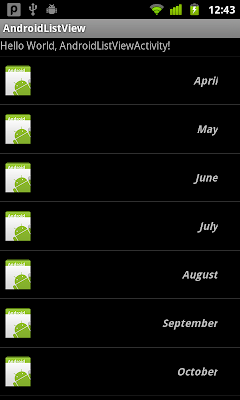
Copy the file android-sdk-linux_x86/platforms/android-7/data/res/layout/layout/simple_list_item_1.xml, rename mylistlayout.xml, and paste into /res/layout/ folder of your project. Modify it:
/res/layout/mylistlayout.xml
Modify the onCreate() method to use R.layout.mylistlayout in our ListView

Copy the file android-sdk-linux_x86/platforms/android-7/data/res/layout/layout/simple_list_item_1.xml, rename mylistlayout.xml, and paste into /res/layout/ folder of your project. Modify it:
/res/layout/mylistlayout.xml
1
2
3
4
5
6
7
8
9
10
11
12
13
14
15
16
17
18
19
20
21
22
23
| <?xml version="1.0" encoding="utf-8"?> android:id="@android:id/text1" android:layout_width="fill_parent" android:layout_height="wrap_content" android:textStyle="bold|italic" android:gravity="center_vertical|right" android:paddingRight="30dip" android:minHeight="?android:attr/listPreferredItemHeight" android:drawableLeft="@drawable/icon"/> |
Modify the onCreate() method to use R.layout.mylistlayout in our ListView
1
2
3
4
5
6
7
8
9
10
11
12
13
14
15
16
17
18
19
20
21
22
23
24
25
26
27
| @Overridepublic void onCreate(Bundle savedInstanceState) { super.onCreate(savedInstanceState); setContentView(R.layout.main); myList = (ListView)findViewById(R.id.list); ArrayAdapter<String> adapter = new ArrayAdapter<String>(this, R.layout.mylistlayout, listContent); myList.setAdapter(adapter); }akmwww.cdacians.com |

No comments:
Post a Comment